
A software list should help you make the next decision
A software inventory can look complete and still leave the most important questions unanswered. Is this the laptop that appeared in yesterday’s export? Does the version reflect its current state? Who can arrange the maintenance window?
When those questions remain unresolved, the team spends its remediation window reconciling records instead of doing the agreed work. A stale entry can direct attention to a computer that has already changed. A missing device can disappear from the discussion altogether.
A useful baseline connects software, device identity, source time and responsibility. You can begin with a small, supported group. The goal is to make decisions traceable and gaps actionable before expanding the process.
Five things a usable record needs
| Context | What to retain | Question it answers |
|---|---|---|
| Device identity | Stable source identifier, name and relevant workspace. | Are we reviewing the intended computer? |
| Software identity | Product, publisher, version and relevant platform or edition. | Does this match the affected software? |
| Source and time | Collection source and observation time, where available. | Can this record support today’s decision? |
| Responsibility | Named person or team for coordination. | Who resolves the question? |
| Coverage gaps | Stale records, missing fields and excluded groups. | What still needs checking? |
Collection time and import time are different. A file uploaded today may contain observations from last week. Preserve the distinction where your source provides it. Where it does not, record that limitation.
One laptop, two very different handovers
EXPLORE THE ACTUAL SAMPLE INTERFACE
Follow the inventory handover in the product.
Explore the real sample screens behind the article. Select a stage, highlight the relevant area and inspect the image at full size.
Device context
Start with a device you can identify.
The sample asset list connects device names, owners, inventory status and vulnerability context. Use those fields to agree what belongs in the review.
Does the record identify the intended device, responsible team and observation time?
Next handoverResolve missing or stale context before choosing a supported response.
Explore this capability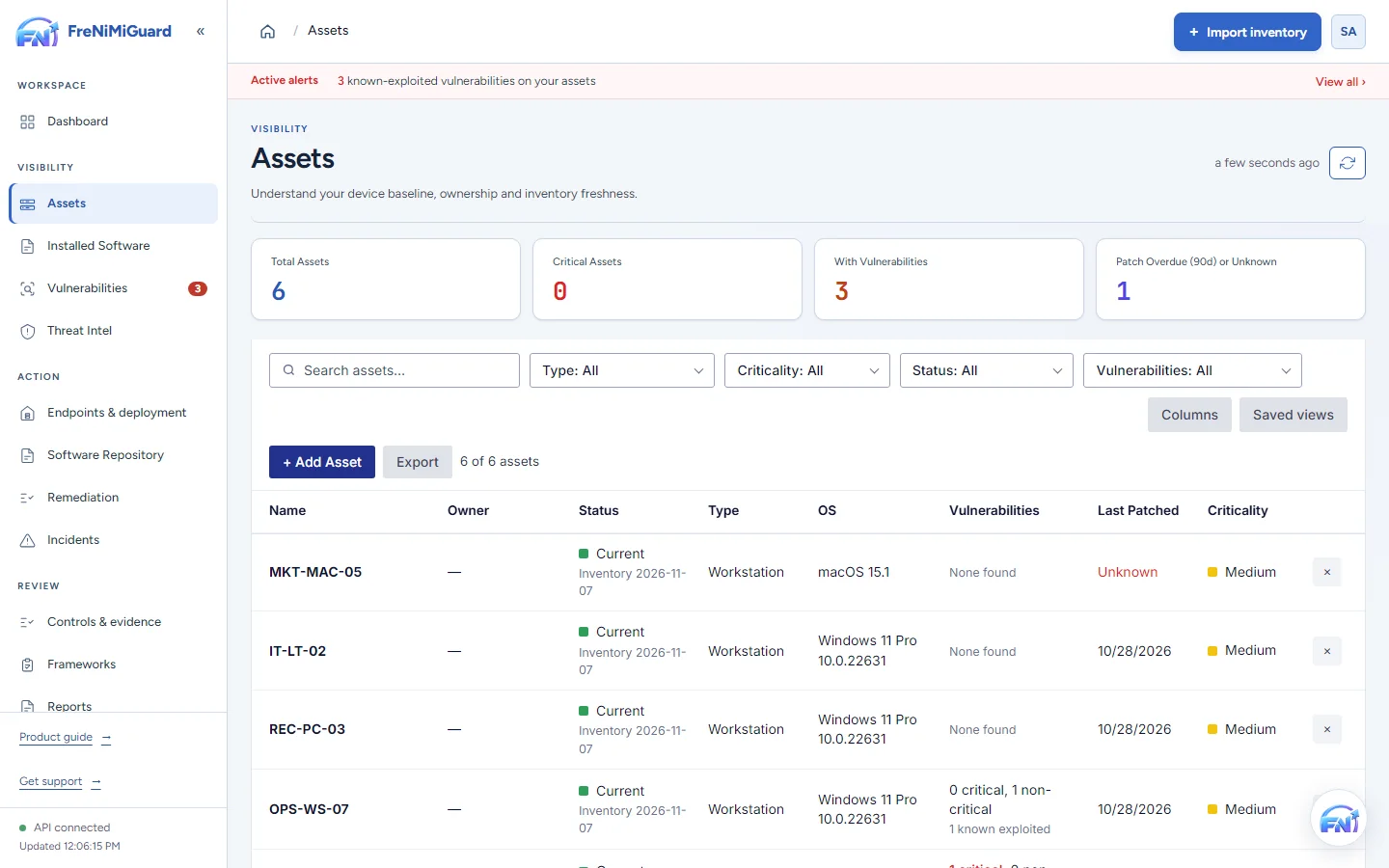
Actual product screenshot with sample records. These screens are not a continuous before-and-after patch test.
Stage: Device context
What does this information let you conclude?
Try a review decision. These are illustrative situations, not a test of your environment.
A later observation can support review of the installed state. Confirm the device, product, source and time before deciding whether it supports closure.
Evidence boundary: a screenshot shows an interface and sample records. A task note or successful command response alone does not establish an observed endpoint outcome. Watch the existing product recordings →
Make the first review small enough to finish
Choose a group your team understands. Include relevant supported device types and source systems, then agree the review owner before importing records.
- Reconcile identity. Investigate duplicate records before assuming they represent different computers.
- Inspect software detail. Similar display names can refer to different packages, editions or platforms.
- Expose the gaps. Identify absent devices and fields that cannot support a matching decision.
- Assign follow-up. Give important uncertainties an owner, next action and review point.
The output is a working baseline and a short list of questions to resolve. It should be clear which records support a remediation decision and which need more investigation.
Turn that context into a FreNiMiGuard workflow
Use software inventory to review supported device and application records, then move into vulnerability management to examine findings in their installed-version context. Carry the device, finding and responsible person into remediation coordination.
Supported imports and collectors provide starting points. Installing the optional endpoint agent is a separate decision for supported collection or configured actions. Review your source, plan and software coverage before choosing the action path.
Make your evaluation concrete
Bring one representative inventory export. Ask to trace one software record from its source through a finding and into an assigned next action. That walkthrough reveals both useful context and missing information.
Questions before you start
Does importing inventory install software?
Importing records and authorising an endpoint action are separate steps. Review the supported collection method and permissions before enabling actions.
How fresh must the inventory be?
Set an expectation that fits the decision and collection method. An observation made before a change cannot establish the state afterwards. Treat missing freshness information as a gap to investigate.
TAKE IT INTO YOUR NEXT REVIEW
Your working checklist
Tick items as you prepare. This is a personal preparation aid, not a security assessment. Selections reset when this page reloads.
0 of 6 preparation items checked.
Sources and context
CIS Control 2: Inventory and Control of Software Assets describes managing software assets as an active discipline. The review fields and fictional example here are practical suggestions from FreNiMi, not a CIS certification or endorsement.