
Choose your inventory source
Use supported Intune or Jamf inventory imports, a fleet CSV, a collector or the optional endpoint agent. Start with a representative device group so your team can compare the result with its existing inventory.
Software and device inventory
Bring supported devices and installed software into one workspace. Review version details, device ownership and inventory freshness before deciding what needs attention.
Inspect the real sample screens below.
What your team can do
Use supported Intune or Jamf inventory imports, a fleet CSV, a collector or the optional endpoint agent. Start with a representative device group so your team can compare the result with its existing inventory.
An application name alone is not enough to plan a change. Review the reported version and the device it belongs to, then check who is responsible for that computer and whether its inventory is current.
Use inventory as the starting point for software-risk review. Investigate missing or unexpected information before treating a device as covered. Imported records and endpoint observations can arrive at different times.
EXPLORE THE ACTUAL SAMPLE INTERFACE
Inspect device context, the finding it can support and the work that needs an owner.
Device context
The sample asset list connects device names, owners, inventory status and vulnerability context. Use those fields to agree what belongs in the review.
Does the record identify the intended device, responsible team and observation time?
Next handoverResolve missing or stale context before choosing a supported response.
Explore this capability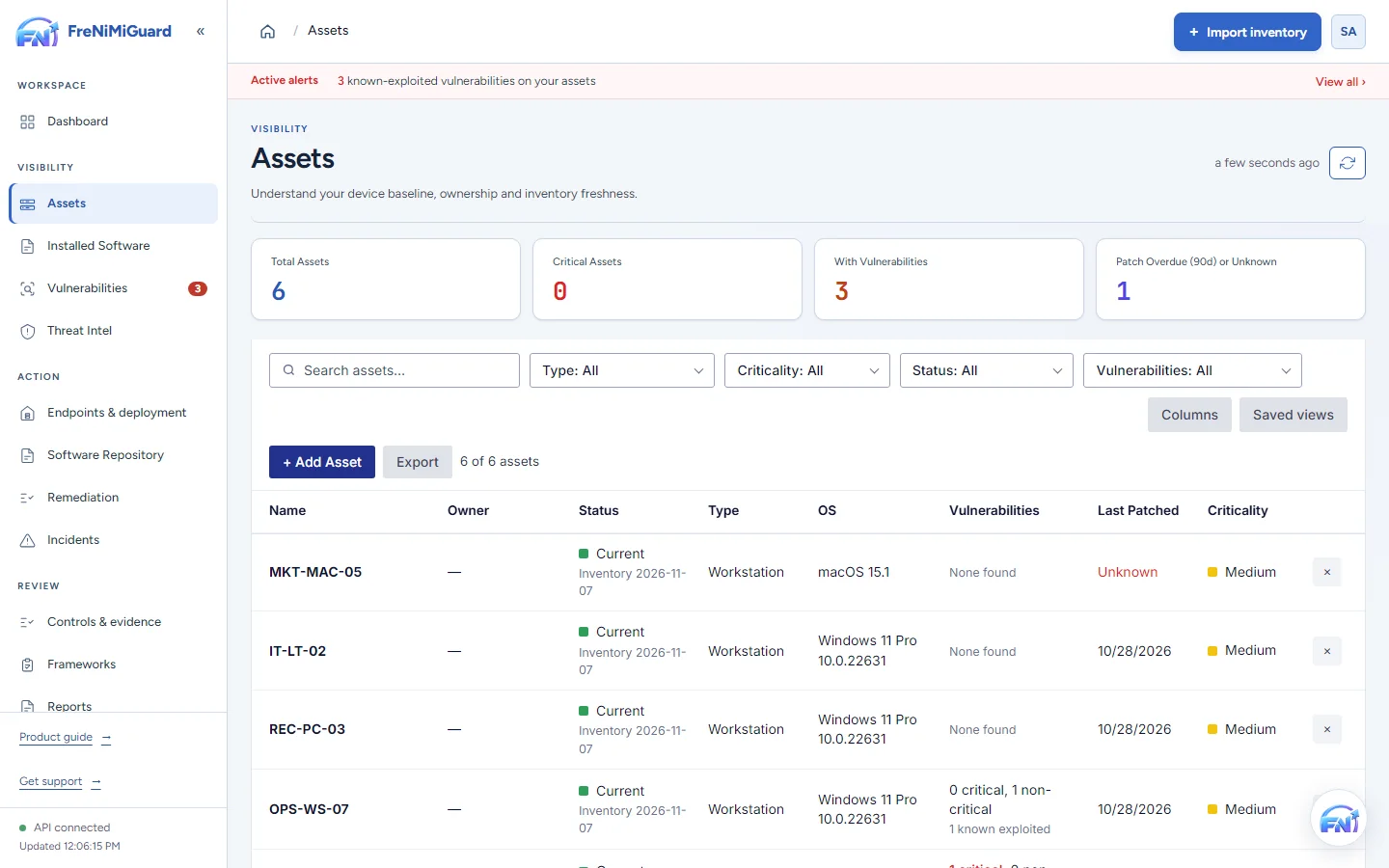
Actual product screenshot with sample records. These screens are not a continuous before-and-after patch test.
Stage: Device context
Evidence boundary: a screenshot shows an interface and sample records. A task note or successful command response alone does not establish an observed endpoint outcome. Watch the existing product recordings →
Review checkpoints
| Checkpoint | What to review | What to keep visible |
|---|---|---|
| Source freshness | Check when the source last observed the device. | A recent import can still contain an old endpoint observation. |
| Device identity | Compare the device identifier with its source. | Investigate duplicate or renamed devices before counting coverage. |
| Software detail | Review application names, vendors and versions. | Missing fields can limit matching and need source review. |
Questions before rollout
No. Supported inventory imports and collectors offer other starting points. The optional endpoint agent is used for supported local collection and approved actions; these are separate choices.
Confirm supported operating systems, source fields and device types during evaluation. Medical, industrial and specialist operational devices require separate suitability review.
Continue exploring
Review software findings with affected-device context and known exploitation information. Give the team a clear starting point for investigation and remediation ownership.
Explore capabilityCoordinate supported updates and software deployments with clear approval and device scope. Use the optional agent for supported actions, with the configuration and permissions your environment requires.
Explore capabilityGive a finding an owner, track the follow-up and keep the result with the task. Distinguish work that was planned, sent, observed and still needs review.
Explore capabilityBring control-review work and supporting records together. Use the tools included in your plan to organise checklists, evidence and available exports.
Explore capabilityTurn software findings and remediation work into a clearer conversation with leadership. Use summaries and supported exports to explain progress, unresolved items and the next decisions.
Explore capabilityBring your device sources, remediation process and review expectations. Agree a supported scope before rollout.