
Give the handover enough detail
Record the affected device, software, owner and due date so the next person can act without rebuilding the context. Keep the task connected to the finding that triggered the work.
Remediation and verification
Give a finding an owner, track the follow-up and keep the result with the task. Distinguish work that was planned, sent, observed and still needs review.
Inspect the real sample screens below.
What your team can do
Record the affected device, software, owner and due date so the next person can act without rebuilding the context. Keep the task connected to the finding that triggered the work.
When the optional agent is used, review the next inventory and verification state the product reports. A stale or missing observation is different from an observed change. Without agent-based checking, keep supporting verification notes.
A clear review includes unresolved items, not only completed tasks. Keep failed actions, unavailable devices and checks that still need attention with the record so a reviewer can understand what remains.
EXPLORE THE ACTUAL SAMPLE INTERFACE
Follow the work record and inspect the source context that a closure decision still needs.
Coordinated work
The sample remediation screen shows task names, owners, due dates and work states. It illustrates coordination, not proof that an endpoint was patched.
Who owns the work, and what information is needed before it can be closed?
Next handoverKeep the execution outcome and the later source observation distinct.
Explore this capability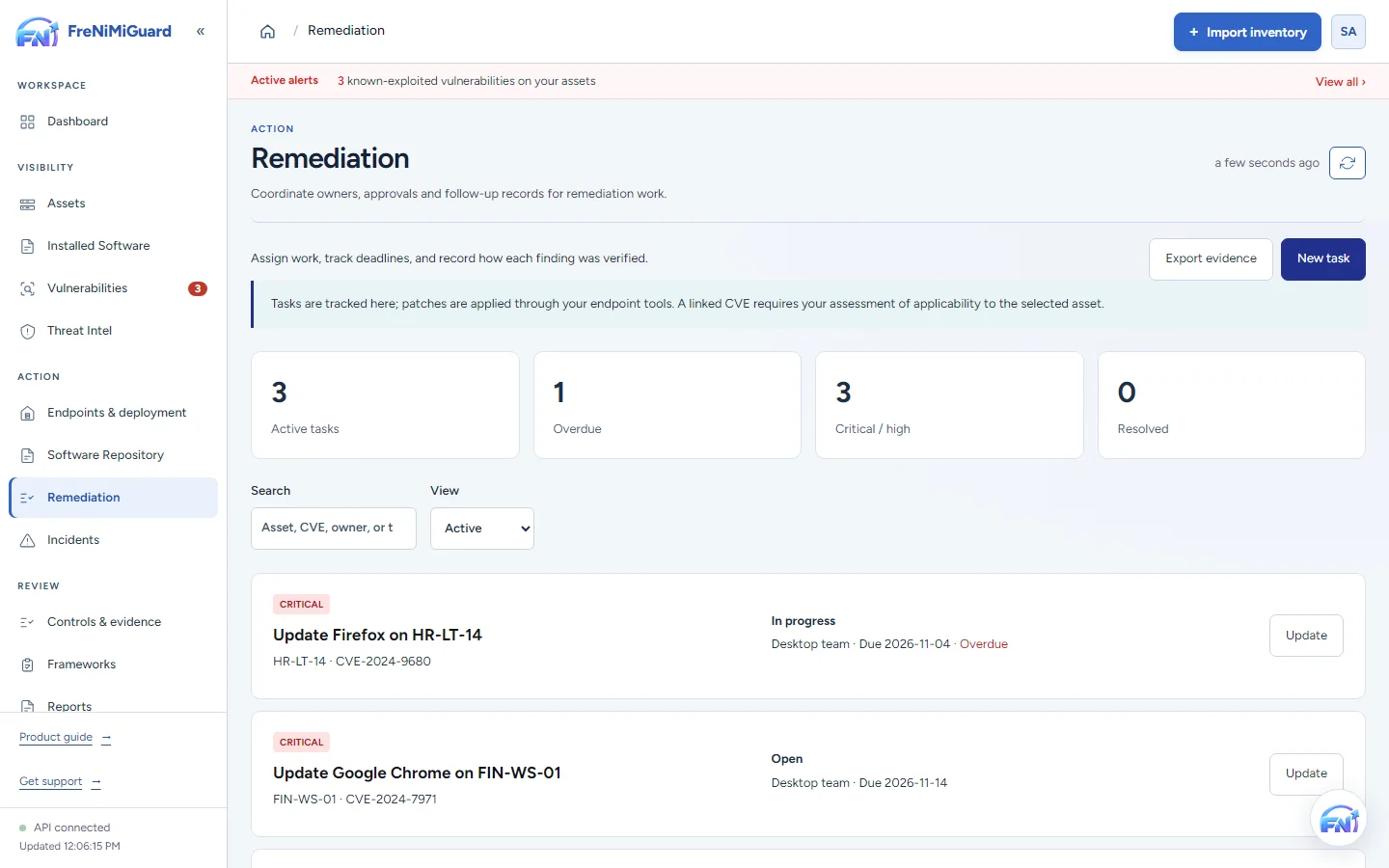
Actual product screenshot with sample records. These screens are not a continuous before-and-after patch test.
Stage: Coordinated work
Try a review decision. These are illustrative situations, not a test of your environment.
A later observation can support review of the installed state. Confirm the device, product, source and time before deciding whether it supports closure.
Evidence boundary: a screenshot shows an interface and sample records. A task note or successful command response alone does not establish an observed endpoint outcome. Watch the existing product recordings →
Review checkpoints
| Checkpoint | What to review | What to keep visible |
|---|---|---|
| Approved | The agreed response and affected device scope. | Approval records intent; it does not show an installation result. |
| Executed | The available action response and status. | An action response may still require a later observation. |
| Observed | The next reported installed version or source result. | An old or missing observation cannot establish the intended outcome. |
Questions before rollout
Keep the device and software context, finding reference, assigned owner, action taken, date, verification observation and any outstanding limitations.
The public sample evidence page shows an illustrative remediation record and supporting export. The product tour uses sample data in the actual interface.
Continue exploring
Bring supported devices and installed software into one workspace. Review version details, device ownership and inventory freshness before deciding what needs attention.
Explore capabilityReview software findings with affected-device context and known exploitation information. Give the team a clear starting point for investigation and remediation ownership.
Explore capabilityCoordinate supported updates and software deployments with clear approval and device scope. Use the optional agent for supported actions, with the configuration and permissions your environment requires.
Explore capabilityBring control-review work and supporting records together. Use the tools included in your plan to organise checklists, evidence and available exports.
Explore capabilityTurn software findings and remediation work into a clearer conversation with leadership. Use summaries and supported exports to explain progress, unresolved items and the next decisions.
Explore capabilityBring your device sources, remediation process and review expectations. Agree a supported scope before rollout.