
A reviewer needs to trace a finding to its affected office computer.
Give each department a clear view of the workplace software findings its team owns.
Explore the supporting capabilityGovernment IT workflows
Agency IT teams need a clear handover between device owners, security reviewers and the people approving change.
Inspect the real sample screens below.
Work in your environment
Give each department a clear view of the workplace software findings its team owns.
Explore the supporting capabilityMake the approval route visible when IT, security and service owners share the decision.
Explore the supporting capabilityKeep the review period and outstanding exceptions with the supporting records.
Explore the supporting capabilityAgree a supported scope
Begin with agency offices and approved workplace computers. Review the source inventory, confirm the device owners and choose a representative group for evaluation. Check what your team expects to see before extending the workflow to more locations or users.
Agency device scope, procurement requirements, hosting expectations and review responsibilities. Explain how findings reach your team today, who approves a change and which records your next internal review needs.
Evaluate the handover
Explore supporting workflows
Bring supported devices and installed software into one workspace. Review version details, device ownership and inventory freshness before deciding what needs attention.
Explore this capabilityGive a finding an owner, track the follow-up and keep the result with the task. Distinguish work that was planned, sent, observed and still needs review.
Explore this capabilityTurn software findings and remediation work into a clearer conversation with leadership. Use summaries and supported exports to explain progress, unresolved items and the next decisions.
Explore this capabilityQuestions before rollout
These are use cases for the same FreNiMiGuard platform. Scope, plan availability and deployment responsibilities are agreed for your organisation.
Use supported records as material within your own review process. Confirm source coverage and limitations. Government authorisation, procurement eligibility or certification is not implied.
Bring the device sources, workflow owners and review requirements to a conversation. Inspect the product tour, then agree a small evaluation scope before connecting systems.
EXPLORE THE ACTUAL SAMPLE INTERFACE
Administrative workplace devices need named owners and an agreed review boundary. This walkthrough does not imply suitability for every public-sector or specialist system.
Device context
The sample asset list connects device names, owners, inventory status and vulnerability context. Use those fields to agree what belongs in the review.
Which supported devices and responsible teams belong in this government review?
Next handoverResolve missing or stale context before choosing a supported response.
Explore this capability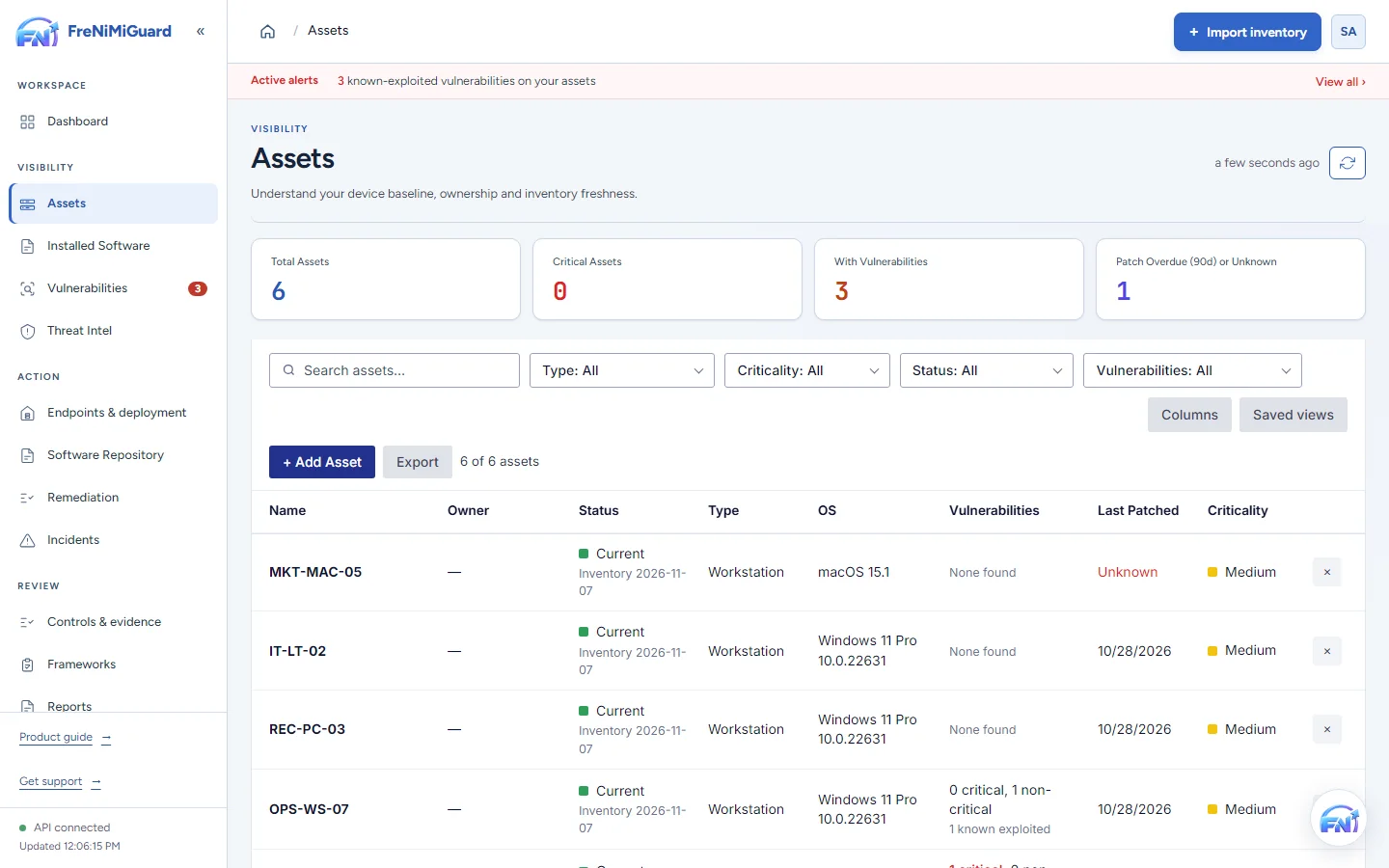
Actual product screenshot with sample records. These screens are not a continuous before-and-after patch test.
Stage: Device context
Evidence boundary: a screenshot shows an interface and sample records. A task note or successful command response alone does not establish an observed endpoint outcome. Watch the existing product recordings →
Prepare your evaluation
Bring your device sources, remediation process and review expectations. Agree a supported scope before rollout.