
EXPLORE THE ACTUAL SAMPLE INTERFACE
Read the record in its workflow context.
The sample interfaces below are separate from the example export on this page. Neither a screenshot nor a saved task alone proves an endpoint reached the intended state.
Coordinated work
Give the next action a person and a review point.
The sample remediation screen shows task names, owners, due dates and work states. It illustrates coordination, not proof that an endpoint was patched.
Who owns the work, and what information is needed before it can be closed?
Next handoverKeep the execution outcome and the later source observation distinct.
Explore this capability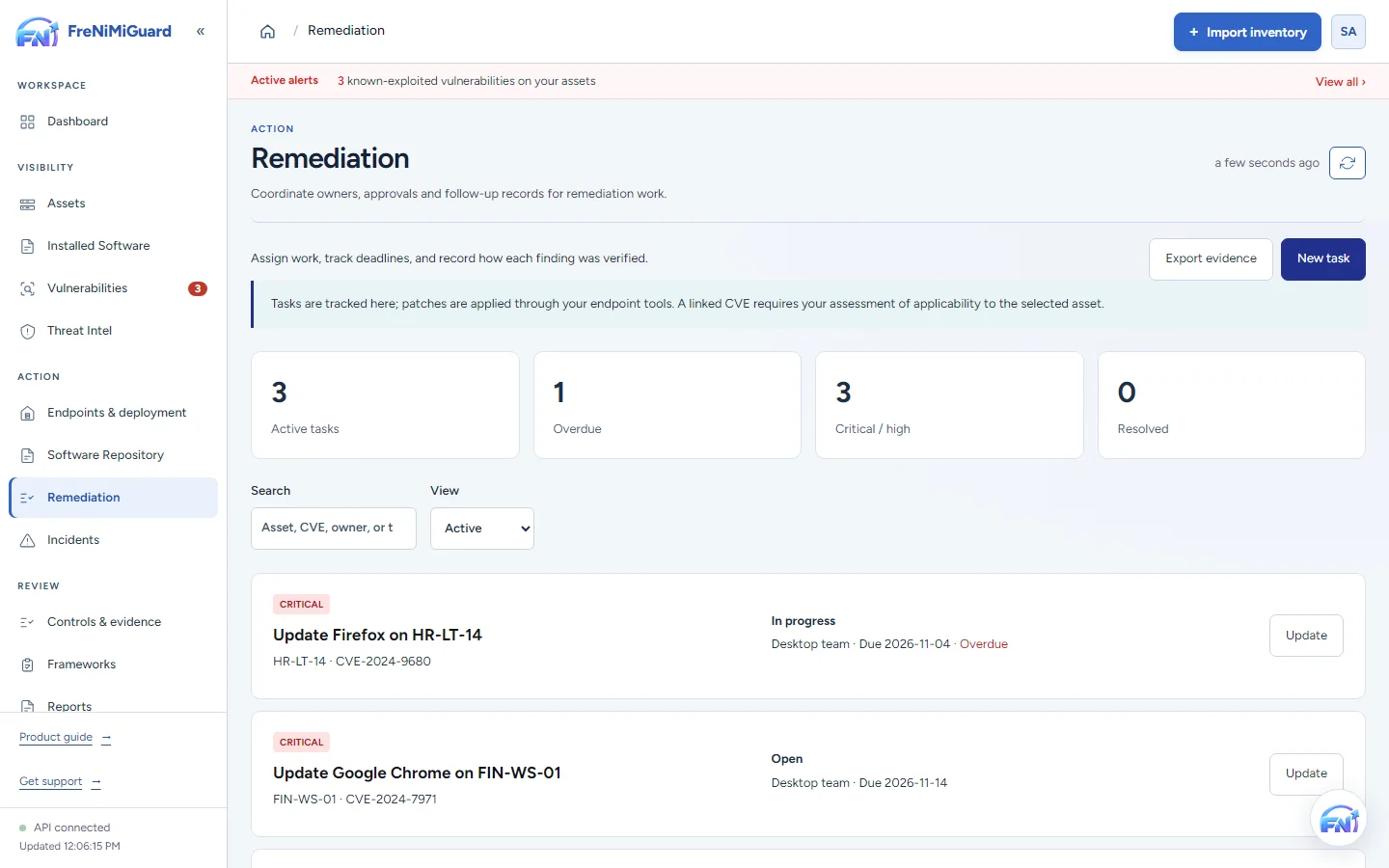
Actual product screenshot with sample records. These screens are not a continuous before-and-after patch test.
Stage: Coordinated work
What does this information let you conclude?
Try a review decision. These are illustrative situations, not a test of your environment.
A later observation can support review of the installed state. Confirm the device, product, source and time before deciding whether it supports closure.
Evidence boundary: a screenshot shows an interface and sample records. A task note or successful command response alone does not establish an observed endpoint outcome. Watch the existing product recordings →
Sample evidence record
Published October 23, 2026. This is a sample with illustrative data, not a customer's record. It shows the format of the remediation evidence a FreNiMiGuard workspace exports: one record for every vulnerability closed in a period, signed so its integrity can be checked against the supplied key. A valid signature does not establish that an endpoint changed or that a closure decision was correct. This illustrative record is not a real-device acceptance result.
What the sample record describes
- What was found, on which computer, and when.
- The deadline that applied, and whether it was met.
- Who requested and approved the fix, and how: an administrator's approval, a passkey signature over the exact command, or patch automation.
- The command the computer received (by its SHA-256), its result and output, and the version before and after.
- The closure basis: a source observation or a person’s recorded decision. These are different evidence types; a note is not an observed software state.
One record, as exported
Each export is a JSON file. Here is the summary and one of its records (the signature is shortened):
{
  "report": "FreNiMiGuard remediation evidence",
  "workspace": "Example Clinic Ltd",
  "period": { "from": "2026-09-01", "to": "2026-09-30" },
  "generated_at": "2026-10-01T08:00:12+00:00",
  "summary": {
    "closed": 41, "verified_automatically": 37, "fixed_by_frenimiguard": 29,
    "closed_by_people": 3, "risk_accepted": 1, "known_exploited_closed": 4,
    "met_deadline_pct": 95, "median_days_to_close": 3
  },
  "items": [
    {
      "cve": "CVE-2024-7971",
      "title": "Google Chromium V8 Type Confusion Vulnerability",
      "severity": "high",
      "known_exploited": true,
      "asset": "RECEPTION-PC-02",
      "detected_on": "Software: Google Chrome 127.0.6533.120",
      "first_seen": "2026-09-02T09:14:03+00:00",
      "deadline": "2026-09-09",
      "closed_at": "2026-09-03T10:42:51+00:00",
      "status": "not_affected",
      "met_deadline": true,
      "days_to_close": 1,
      "closure": "verified_automatically",
      "closed_by": "FreNiMiGuard verification",
      "evidence": "Installed version 128.0.6613.85 is outside every affected range NVD publishes (fixed in 128.0.6613.84).",
      "installed_now": "Google Chrome 128.0.6613.85",
      "fix": {
        "action_id": "act-3f9a1c0d7e21",
        "type": "app_update",
        "title": "Update Google Chrome",
        "requested_by": "j.okafor",
        "requested_at": "2026-09-03T10:02:17+00:00",
        "approved_by": "a.mensah",
        "approved_at": "2026-09-03T10:05:40+00:00",
        "approved_with": "passkey",
        "passkey_approval": {
          "key": "pK3vQ0yR8sT1uW4x",
          "authenticator_data": "SZYN5YgOjGh0NBcPZHZgW4_krrmihjLHmVzzuoMdl2MFAAAABw==",
          "client_data": "eyJ0eXBlIjoid2ViYXV0aG4uZ2V0Iiwi...",
          "signature": "MEUCIQC4n0x...Ag=="
        },
        "command_sha256": "9d2c4e1f0b7a...e81b",
        "signed_with_key": "ab12cd34ef56ab12",
        "executed_at": "2026-09-03T10:09:58+00:00",
        "result": "succeeded",
        "exit_code": 0,
        "output_excerpt": "Successfully installed",
        "version_before": "Google Chrome 127.0.6533.120"
      }
    }
  ],
  "signature": {
    "algorithm": "RSASSA-PKCS1-v1_5 with SHA-256",
    "covers": "The text 'FRENIMIGUARD-EVIDENCE 1' and a newline, then this report without its 'signature' field as JSON with sorted keys and no spaces (UTF-8).",
    "key_fingerprint": "ab12cd34ef56ab12",
    "public_key_pem": "-----BEGIN PUBLIC KEY-----\n...\n-----END PUBLIC KEY-----",
    "value": "Jx0c...=="
  }
}
Reading a record
| Field | Meaning |
|---|---|
closure | verified_automatically: the computer's next inventory showed a version outside the affected range, or the vendor's data ruled it out. fixed_and_confirmed: the fix succeeded and a person closed the finding. closed_by_person and risk_accepted: closed by a person, with their note in evidence. |
approved_with | passkey: an administrator's passkey signed the exact command, and the computer checked that signature before running it. administrator approval: approved in FreNiMiGuard. automation: queued by a patch automation policy an administrator approved. |
command_sha256 | The SHA-256 of the signed command the computer received. With a passkey approval, the passkey's signature covers this exact command. |
signed_with_key | The fingerprint of the workspace key that signed the command. Computers pin this key when they enroll and refuse commands signed with any other. |
met_deadline, days_to_close | Measured from when FreNiMiGuard first found the vulnerability on that computer to when it was closed, against the deadline from the workspace's policy: days by severity, or CISA's due date for known exploited vulnerabilities when the workspace uses them. |
Checking a record yourself
Inside FreNiMiGuard, Reports > Evidence verifies an exported file in one step. Without FreNiMiGuard, anyone can check the signature with the public key the file carries, for example in Python:
import base64, json
from cryptography.hazmat.primitives import hashes, serialization
from cryptography.hazmat.primitives.asymmetric import padding

report = json.load(open("evidence.json", encoding="utf-8"))
sig = report.pop("signature")
body = b"FRENIMIGUARD-EVIDENCE 1\n" + json.dumps(
    report, sort_keys=True, separators=(",", ":"), ensure_ascii=False).encode()
key = serialization.load_pem_public_key(sig["public_key_pem"].encode())
key.verify(base64.b64decode(sig["value"]), body, padding.PKCS1v15(), hashes.SHA256())
print("Unchanged since it was signed by key", sig["key_fingerprint"])
Then confirm the fingerprint is your provider's workspace key, which FreNiMiGuard shows under Endpoints > Settings. A file changed after signing, even by one character, fails the check.
Request a full example
For a complete sample export, or to see the evidence from your own trial workspace, contact info@frenimi.com. See what FreNiMiGuard detects and how actions are approved and signed.