
Open with the decision you need
A report can show a falling findings count while the most important question remains unanswered: which unresolved item needs a decision today? The audience may need to approve a maintenance window, assign an owner, investigate a failed action or agree a time-bounded exception.
Start by naming those decisions. Keep the detail supporting them close enough to inspect. An IT owner or service provider should be able to explain the work without reconstructing the story from a deployment console, a spreadsheet and a chain of messages.
The review earns its place when it helps the team move work forward and makes the reason for each decision understandable afterwards.
A simple structure for a useful review
| Part of the review | Question to answer | Supporting detail |
|---|---|---|
| Scope | What environment and period does this cover? | Device group, sources, collection period and exclusions. |
| Change | What progressed since the last review? | New findings, actions taken and observations reviewed. |
| Outstanding work | What is blocked, open or uncertain? | Owner, deadline, work state and missing information. |
| Decision | What needs the audience’s agreement? | Proposed response, dependencies and decision authority. |
| Follow-up | What happens before the next review? | Named person, next action and agreed review point. |
State what each count represents. Devices, findings, unique vulnerabilities and attempted actions are different units. Changes in source coverage can alter a count without representing a fix.
Replace “we patched everything” with a reviewable summary
EXPLORE THE ACTUAL SAMPLE INTERFACE
Trace the review back to its supporting detail.
Use the sample screens to see what a summary, work item and finding can contribute to a review. They do not demonstrate an independently verified outcome.
Review material
Keep the detail behind the summary available.
The sample report lists individual CVEs, assets and prioritisation context. It demonstrates a review surface, not a live statement about your environment.
Can the reviewer trace a summary item back to the relevant device and finding?
Next handoverState source coverage and unresolved outcomes when sharing a review.
Explore this capability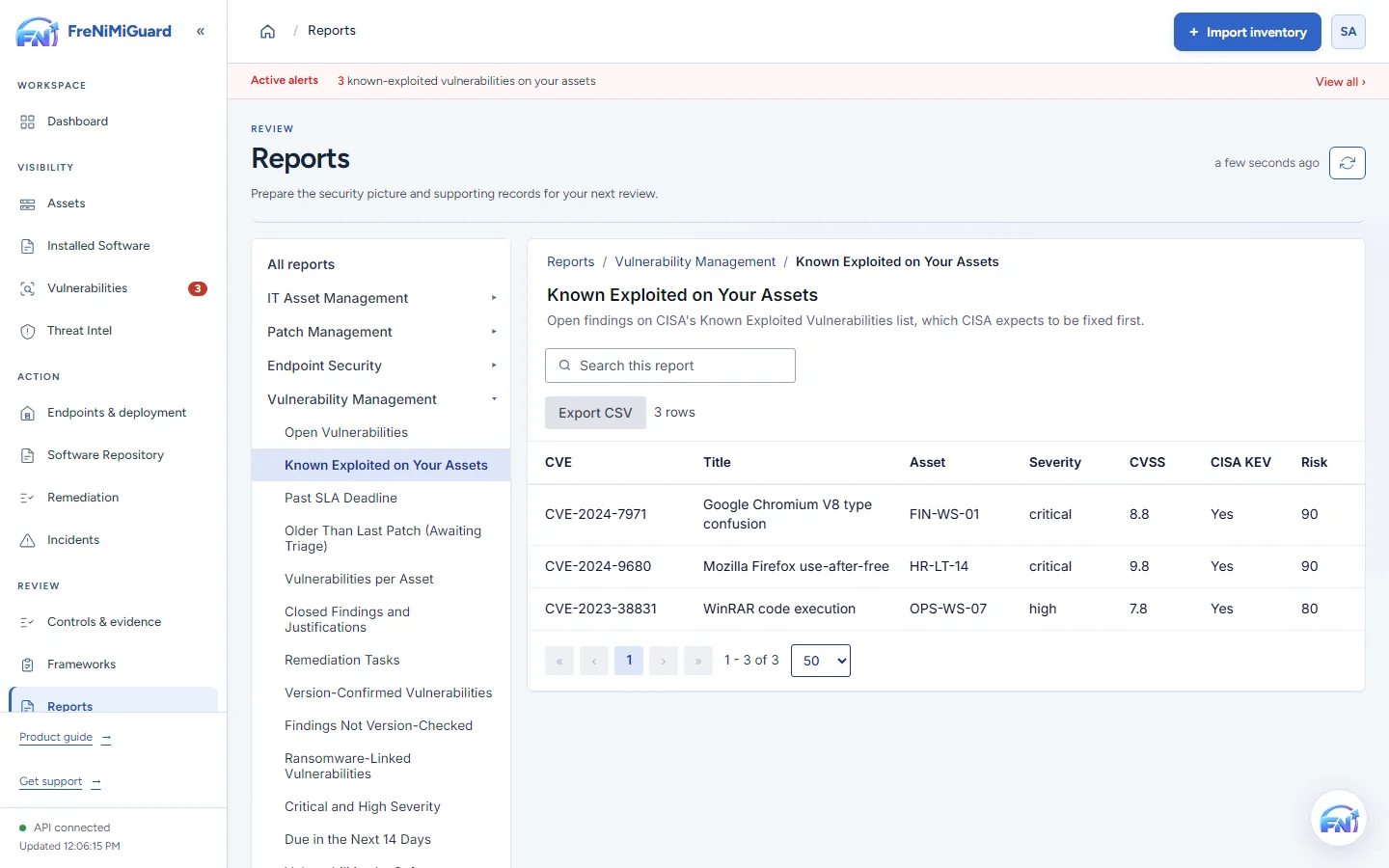
Actual product screenshot with sample records. These screens are not a continuous before-and-after patch test.
Stage: Review material
What does this information let you conclude?
Try a review decision. These are illustrative situations, not a test of your environment.
A later observation can support review of the installed state. Confirm the device, product, source and time before deciding whether it supports closure.
Evidence boundary: a screenshot shows an interface and sample records. A task note or successful command response alone does not establish an observed endpoint outcome. Watch the existing product recordings →
Make the summary traceable to its supporting record
For each significant item, retain the device or group, finding, intended response, execution result and available follow-up observation. Include collection times and source references where available.
Call out stale inventory, excluded groups and checks that could not be completed. If the underlying data is incomplete, describe the report as a view of the available records. Otherwise the reader may assume it represents every computer.
Before sharing an export, check its audience and contents. Include the detail the review needs and follow your organisation’s handling process.
Use a decision log the next person can act on
| Item | Decision or next step | Ownership and timing |
|---|---|---|
| Observation missing | Refresh the relevant source and compare the installed version. | Named IT owner; next agreed review. |
| Update failed | Investigate the error and agree the next supported attempt. | Deployment owner; agreed maintenance window. |
| Temporary exception | Record the reason, decision authority and conditions for revisiting it. | Accountable decision owner; explicit review date. |
Avoid assigning everything to “IT”. Name the person or team that can perform the next action. Distinguish that responsibility from the authority to accept a risk or approve a change.
Prepare the conversation with FreNiMiGuard
Use security reporting for workspace summaries and supported exports, remediation records for follow-up detail and controls and evidence where the review needs that context.
Check the current plan for scheduled reporting, framework tools and export availability. Review a sample evidence record with the intended audience before agreeing a recurring format. Product-generated records support the discussion. They do not guarantee acceptance by an external reviewer or establish that an organisation is compliant.
Make your first walkthrough specific
Bring one recent review question. Ask to trace it from a summary to the finding, response and available observation, then identify the next responsible person.
Questions about the review format
Should every finding appear in the opening summary?
Lead with items needing the audience’s attention and keep supporting detail available. Explain how the summary was selected so its scope is clear.
Does a closed task mean the risk is eliminated?
A closed task records a workflow decision. Explain the evidence and reasoning behind it. Distinguish observed remediation, accepted exceptions and other closure reasons instead of treating them as the same outcome.
TAKE IT INTO YOUR NEXT REVIEW
Your working checklist
Tick items as you prepare. This is a personal preparation aid, not a security assessment. Selections reset when this page reloads.
0 of 7 preparation items checked.
Sources and context
NIST SP 800-40 Rev. 4 provides enterprise patch-management planning context. This meeting structure, decision log and fictional summary are practical suggestions from FreNiMi, not an audit standard or a compliance determination.