
Connect a finding to the software
Review the reported application and installed version alongside the vulnerability source. A match is a reason to investigate the affected software, not a substitute for understanding the device and its role.
Vulnerability management
Review software findings with affected-device context and known exploitation information. Give the team a clear starting point for investigation and remediation ownership.
Inspect the real sample screens below.
What your team can do
Review the reported application and installed version alongside the vulnerability source. A match is a reason to investigate the affected software, not a substitute for understanding the device and its role.
CISA Known Exploited Vulnerabilities and NVD information help explain why a finding may need attention. Combine this context with the importance of the asset, exposure and your own priorities.
Turn the review into assigned work. Record an owner and due date, then follow the remediation task rather than leaving the decision in a spreadsheet or an unowned alert.
EXPLORE THE ACTUAL SAMPLE INTERFACE
Read the risk context, confirm the device baseline and keep the response assigned.
Finding context
The sample findings view separates the CVE, exploitation context, software and remediation state. A task being assigned is different from the underlying finding being resolved.
Which affected device and installed version support the decision to investigate?
Next handoverAgree the owner and permitted response for the finding you reviewed.
Explore this capability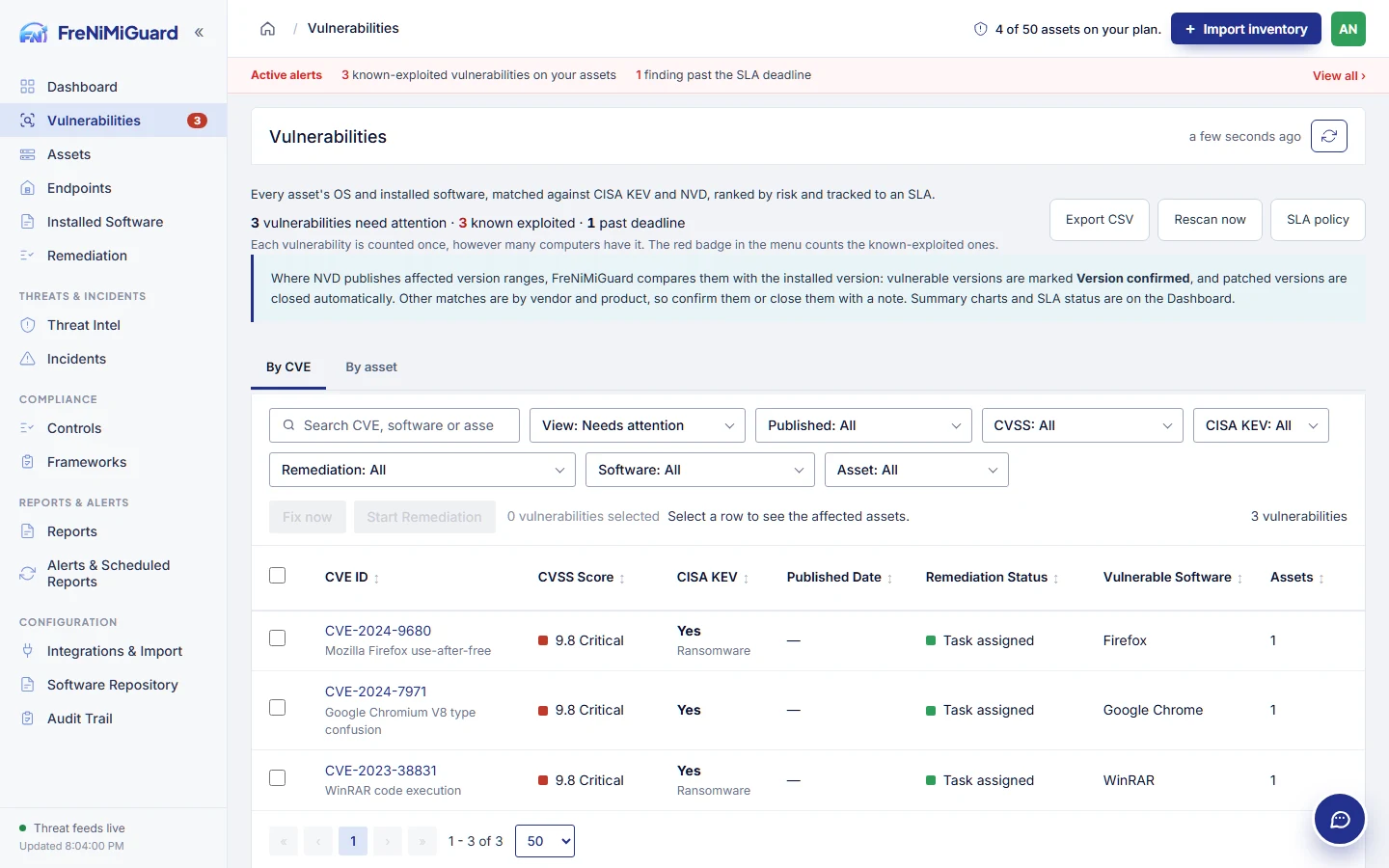
Actual product screenshot with sample records. These screens are not a continuous before-and-after patch test.
Stage: Finding context
Evidence boundary: a screenshot shows an interface and sample records. A task note or successful command response alone does not establish an observed endpoint outcome. Watch the existing product recordings →
Review checkpoints
| Checkpoint | What to review | What to keep visible |
|---|---|---|
| Version context | Compare the installed version with the affected range. | Keep uncertain matches open for analyst review. |
| Source context | Review the finding source and available exploitation information. | A source priority does not describe every business dependency. |
| Next action | Assign an owner and agree the supported response. | A finding alone does not authorise an endpoint change. |
Questions before rollout
Consider exploitation information, asset importance and exposure alongside severity. Use the workspace to organise the review and document the decision.
Keep its ownership and follow-up visible. Check the reported version, source and device context before approving a change or deciding that a finding no longer applies.
Continue exploring
Bring supported devices and installed software into one workspace. Review version details, device ownership and inventory freshness before deciding what needs attention.
Explore capabilityCoordinate supported updates and software deployments with clear approval and device scope. Use the optional agent for supported actions, with the configuration and permissions your environment requires.
Explore capabilityGive a finding an owner, track the follow-up and keep the result with the task. Distinguish work that was planned, sent, observed and still needs review.
Explore capabilityBring control-review work and supporting records together. Use the tools included in your plan to organise checklists, evidence and available exports.
Explore capabilityTurn software findings and remediation work into a clearer conversation with leadership. Use summaries and supported exports to explain progress, unresolved items and the next decisions.
Explore capabilityBring your device sources, remediation process and review expectations. Agree a supported scope before rollout.