
Bring inventory into view
Intune, Jamf and supported imports help establish device and software context. Review the source fields before relying on the result.
Explore inventoryConnections and requirements
Start with the information your team already has. Agree each connection’s purpose, permissions and supported scope before configuring access.
EXPLORE THE ACTUAL SAMPLE INTERFACE
Review the destination records, then check source fields, scope and permissions for the specific connection. These screens do not demonstrate every integration.
Device context
The sample asset list connects device names, owners, inventory status and vulnerability context. Use those fields to agree what belongs in the review.
Does the record identify the intended device, responsible team and observation time?
Next handoverResolve missing or stale context before choosing a supported response.
Explore this capability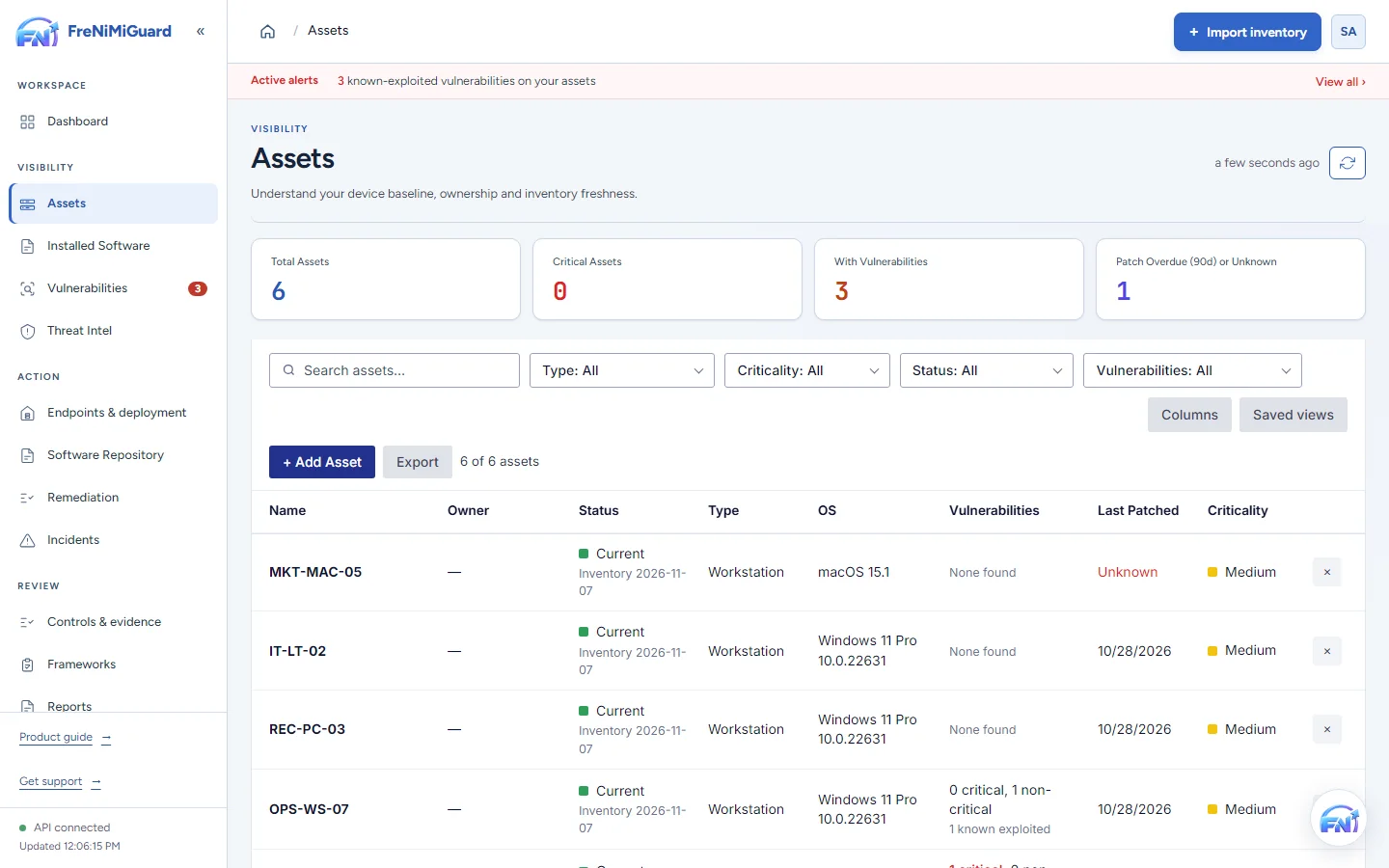
Actual product screenshot with sample records. These screens are not a continuous before-and-after patch test.
Stage: Device context
Evidence boundary: a screenshot shows an interface and sample records. A task note or successful command response alone does not establish an observed endpoint outcome. Watch the existing product recordings →
A connected starting point
 Windows
 macOS
 Linux
 Microsoft Defender
 Tenable
 Jira
 Slack
 Microsoft Teams
 GitHub
 AWS
 IntuneGroup Policy
Logos identify the systems represented. They do not imply a partnership, vendor endorsement, identical functionality or availability in every plan.
Review the connection
| Workflow | Systems to discuss | Before connecting |
|---|---|---|
| Inventory sources | Intune, Jamf, CSV, supported collection methods | Confirm source fields, permissions, sync scope and inventory freshness. |
| Security findings | Tenable and Microsoft Defender workflows | Confirm credentials, accessible data and how imported findings are reviewed. |
| Work coordination | Jira, Slack and Microsoft Teams | Confirm enabled task or notification workflows and plan availability. |
| Cloud and development context | AWS and GitHub workflows | Agree the required evidence or integration scope, credentials and roles. |
| Endpoint deployment context | Supported Windows, macOS and Linux computers; Group Policy where applicable | Confirm agent deployment method and supported actions. Group Policy is a Windows administration capability, not a separate branded connector. |
Before configuration
Keep ownership clear
Ask the source owner to confirm which records the connection should expose and how often the information is refreshed. Review a small result set with that owner. If the workspace shows unexpected devices, missing fields or old observations, resolve the scope before using the result to plan remediation.
Choose the connection by its job
Intune, Jamf and supported imports help establish device and software context. Review the source fields before relying on the result.
Explore inventoryReview enabled security-source and work-coordination connections with their owners. Agree how an external change affects the workspace record.
Read connection detailsAWS and GitHub evidence checks have a different purpose from vulnerability scanning. Confirm the expected evidence and plan entitlement.
Explore evidence toolsBring your device sources, remediation process and review expectations. Agree a supported scope before rollout.