
EXPLORE THE ACTUAL SAMPLE INTERFACE
See where coverage questions enter the workflow.
Device identity, software matching and supported responses have different requirements. Inspect the sample interfaces, then use the published detail below to evaluate your environment.
Device context
Start with a device you can identify.
The sample asset list connects device names, owners, inventory status and vulnerability context. Use those fields to agree what belongs in the review.
Does the record identify the intended device, responsible team and observation time?
Next handoverResolve missing or stale context before choosing a supported response.
Explore this capability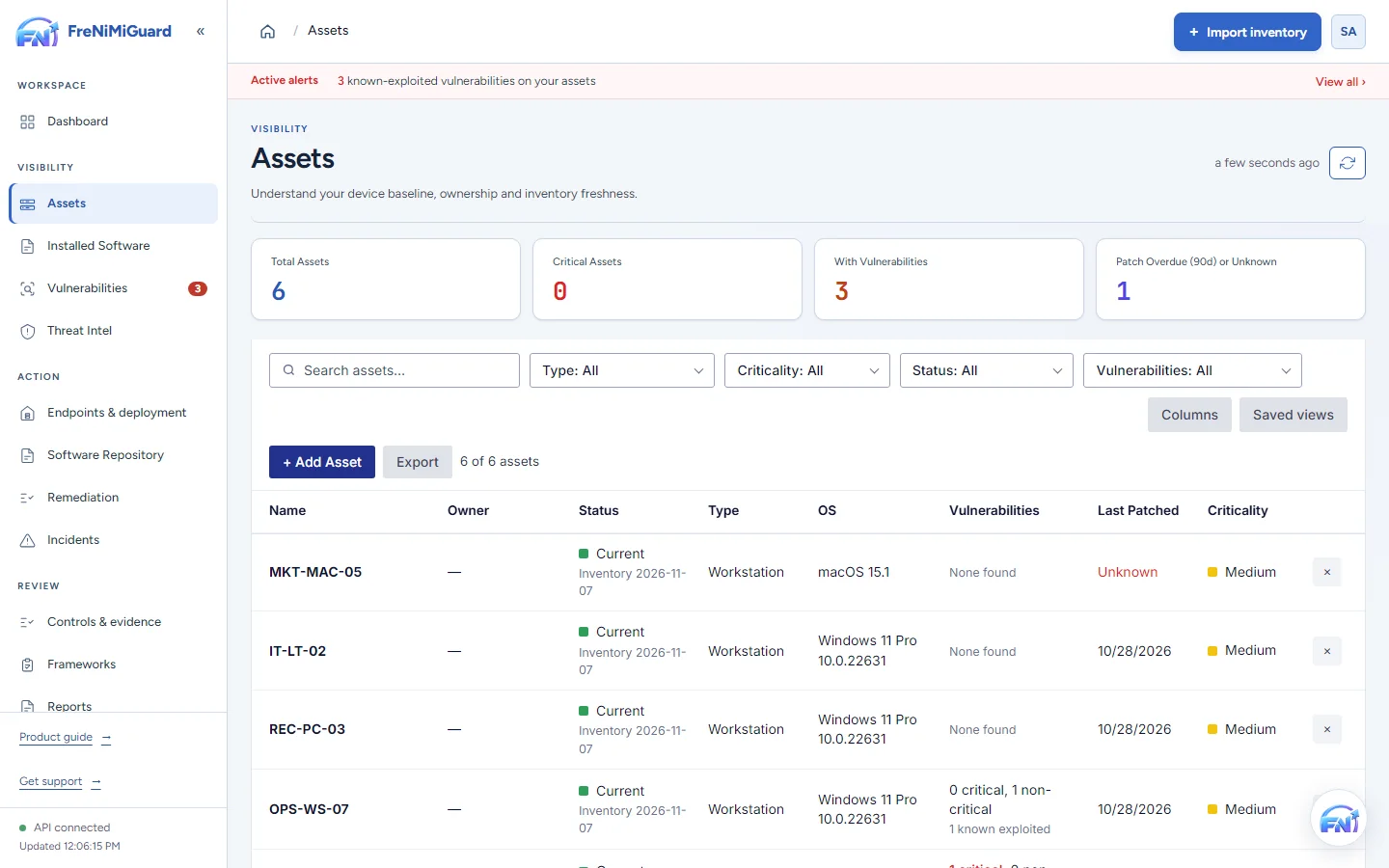
Actual product screenshot with sample records. These screens are not a continuous before-and-after patch test.
Stage: Device context
Evidence boundary: a screenshot shows an interface and sample records. A task note or successful command response alone does not establish an observed endpoint outcome. Watch the existing product recordings →
What FreNiMiGuard detects
Published October 23, 2026. This page describes what the product checks today, where its answers come from, and what it does not cover, so you can judge it before you rely on it.
In short
- Known vulnerabilities (CVEs) in the operating system and installed software of every computer running the FreNiMiGuard agent.
- Answers checked against the vendor's own fix data where the vendor publishes it: Microsoft for Windows, .NET and Microsoft 365 Apps, and Apple for macOS and Safari.
- Computers whose operating system no longer gets security updates, shown as one problem with the fix: upgrade.
- Missing Windows updates, available application updates, and device settings worth reviewing.
- It is not a network, cloud or code scanner. See what it does not cover.
Where the vulnerability data comes from
| Source | Used for | Refreshed |
|---|---|---|
| NIST National Vulnerability Database (NVD) | CVE descriptions, severity (CVSS) and the affected product versions | Daily feed; installed software is checked against NVD's history hourly |
| CISA Known Exploited Vulnerabilities | Which CVEs are exploited in the wild, and federal remediation deadlines | Daily |
| Microsoft Security Response Center | The exact Windows build that fixes each CVE for each Windows release, and fixed .NET and ASP.NET Core versions | Hourly check for new and revised monthly updates |
| Microsoft 365 Apps release history | Which Office build fixes a vulnerability | Regularly |
| Apple security releases | Which macOS and Safari release fixed each CVE for each macOS version | Hourly check for new releases |
| AlienVault OTX (optional) | Threat intelligence on CVEs discussed in active campaigns | Daily, when configured |
How a finding is decided
The agent reports each computer's operating system and installed programs with their exact versions. FreNiMiGuard matches them to CVEs by vendor and product, then checks the version:
- Windows is checked by its full build number against Microsoft's fixed build for that Windows release. Insider builds are judged by the release they are built on.
- macOS is checked against Apple's own security releases, including fixes Apple delivered through Safari, before NVD's version ranges. NVD often records a fix only for the newest macOS.
- Applications are checked against NVD's affected version ranges. A range for a different product build (a VS Code extension, or a phone app) does not count against the program you installed.
- A product named only as the platform another product runs on (Windows or macOS beside an Adobe Reader flaw, for example) is not reported as an operating-system finding.
A finding with a version answer is marked Version confirmed or closed automatically. Without version data the match stays open for an analyst to confirm or close with a note, and every decision is recorded in the audit trail.
Platforms
| Platform | Agent | Reported |
|---|---|---|
| Windows 10 and 11, Windows Server 2016 and later | PowerShell script or MSI, runs as SYSTEM every 5 minutes | Windows build, installed programs (including per-user installs), Windows Update status, available app updates (winget), hardware, disks and encryption, network, accounts and administrators, drivers, USB devices, services, startup items, shares, printers, firewall and antivirus status |
| macOS 12 and later | Shell script, runs as root under launchd | macOS version, applications (including Safari), hardware, disks and FileVault, network, accounts, firewall |
| Linux (Debian, Ubuntu, RHEL, Fedora, SUSE and others with systemd or cron) | Shell script, runs as root | Distribution, installed packages, hardware, disks, network, accounts, services, firewall |
Each agent also reports devices on its local network that it has exchanged traffic with, and can ping its own subnet on request, to show computers that have no agent yet.
What it does not cover
- Network scanning. FreNiMiGuard does not probe ports, services or other devices for vulnerabilities. Routers, printers, phones and other devices without an agent are listed when seen, but not assessed.
- Cloud, containers and code. It does not scan cloud configuration, container images, web applications or source code.
- Linux backports. Debian, Ubuntu and Red Hat often fix a vulnerability without changing the upstream version number. FreNiMiGuard compares package versions with NVD, so a package your distribution has already patched can still appear. Confirm it against the distribution's security advisory and close it with a note.
- Configuration weaknesses. Device settings are reported for review, but FreNiMiGuard is not a benchmark (CIS or STIG) assessment tool.
- Software the agent cannot see. Portable programs that aren't installed, and software inside virtual machines, are not reported unless the agent runs there too.
Works with the tools you already use
- Microsoft Defender Vulnerability Management (Defender for Endpoint, including US Government GCC and GCC High): import each device's vulnerabilities through a read-only Entra app. FreNiMiGuard sets deadlines, sends fixes and records evidence, and supports review of imported finding status. Confirm the follow-up source and closure behaviour during evaluation.
- Tenable Vulnerability Management and Nessus Professional: import their scan findings, including servers and network devices the agent can't cover. FreNiMiGuard then sets deadlines, sends fixes and records evidence, and supports review of imported finding status. Confirm the follow-up sync and closure behaviour for your connection during evaluation. Each sync shows how many of those assets FreNiMiGuard's own agents already cover.
- Microsoft Intune and Jamf Pro: import device and software inventory from managed computers.
- Jira: remediation tasks become Jira issues, and an issue closed in Jira resolves its task here, with the issue as evidence.
- Slack and Microsoft Teams: alerts and scheduled reports as readable messages, or any HTTPS webhook.
- AWS and GitHub: read-only checks that become compliance evidence.
Every connection is read-only toward the other tool, except Jira, where FreNiMiGuard only creates issues. Credentials are encrypted at rest.
Fixing what it finds
From a finding, FreNiMiGuard can send the fix to the computer: Windows security updates, application updates through winget or the package manager, macOS software updates and Microsoft 365 Apps updates. Every fix is an approved, signed action, and the next inventory confirms whether it worked. See Security for how actions are approved and signed, and how each computer limits what it will run.
Questions
For the evidence FreNiMiGuard keeps for each vulnerability it closes, see the sample evidence record.
If you need coverage for something not listed here, or evidence of how a specific finding was decided, contact info@frenimi.com.